Apple iPhone - Turn Silent Mode On / Off
Here's how to turn Silent Mode on or off if your iPhone doesn't ring or vibrate or you want it to.
iPhone 15 Pro and iPhone 15 Pro Max have an Action button instead of a Ringer switch.
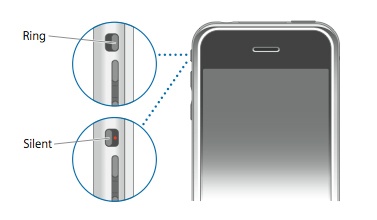
- From the top left edge of your Apple® iPhone®, slide theRinger switchto turn Silent Mode on (sound is off, the switch is in red position)
or off
.
The silent mode / ringer notification briefly appears on the screen.If the switch appears to be stuck, remove the case to ensure the switch isn't blocked.
For more info on adjusting sounds and vibrations, check out this Apple Support page.