Apple iPhone - Set Default Calendar
Here's how to set the default calendar on your iPhone if you have multiple calendars.
- When you add a new event, it's added to your default calendar, but you can change your default calendar from your device or from iCloud.com.
- From a Home screen, navigate:.SettingsCalendarIf an app isn't available on your Home screen, swipe left to access the App Library.
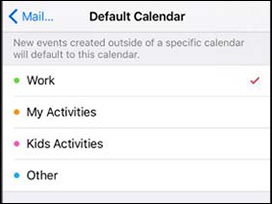
- TapDefault Calendar.
- Choose the calendar you want to be the default (e.g., Work, My Activities, etc.).Enabled when a checkmark is present.