One Talk - Share Name ID
Here's how to change the name that displays on caller ID when you call using your One Talk phone.
- Sign in to My Business.
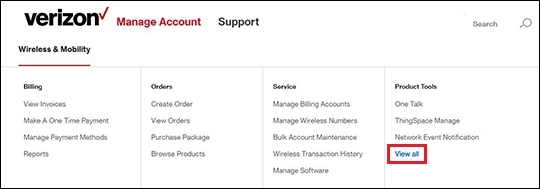
- ClickManage Account.
- From the Product Tools section, clickView all.
- From the Product Tools list, clickName ID Services.If not enrolled, Name ID Services appears in the Recommended Services list at the bottom of the page.Name ID Services only appears on this page if the feature is enabled on the account.
- Click theShare Name ID tab.
- Follow the on-screen instructions to complete the preferred transaction:
- View Current Lines and the corresponding Display Name
- Change Display Name
- Select the preferred line(s) to be customized, then clickChange Display Name.
- Enter the appropriate info then clickSubmit Changes.
- Add / Remove Lines