One Talk Mobile App / Enhanced Dialer - Manage Call Features
Here's how to use call features (e.g., call forwarding, do not disturb, etc.) via the One Talk mobile app.
A limited set of these functions are available on the iOS Native Dialer device settings while others can be managed through Feature Access Codes.
Mobile App Features
Click here for a list of supported devices.
- Open the One Talk app.
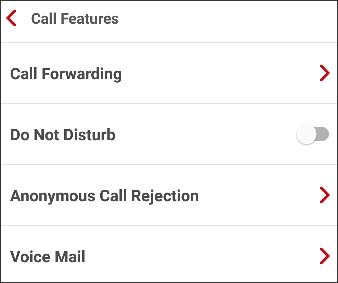
- Navigate:.MenuSettingsCall Features
- Follow the on-screen instructions to configure the following settings as preferred:
- Call-ThroughSelect 'call through' or 'app dialing' mode.
- Call Forwarding
- Call Forward Number Management
- Call Forwarding Always - On/Off
- Call Forwarding Busy - On/Off
- Call Forwarding No Answer - On/Off
- Transfer to my cell
- Phone number selection
- On/Off
- Do Not Disturb - On/OffOnly available onAndroiddevices.
- Anonymous Call Rejection - On/Off
- Voice MailOnly available in Mobile App and not in Enhanced Dialer
- Greeting selection
- Record greeting

Enhanced Dialer Features
Click here for a list of supported devices.
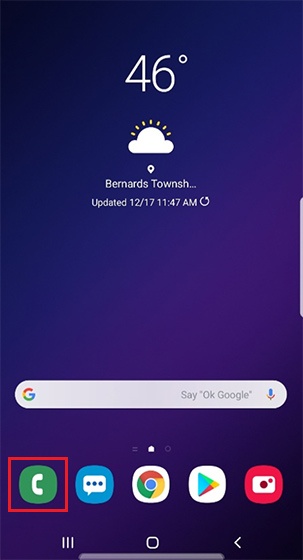
- Open the phone dialer.
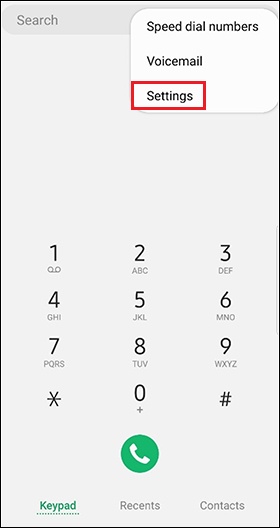
- Tap theMenu icon
(upper-right) then tap
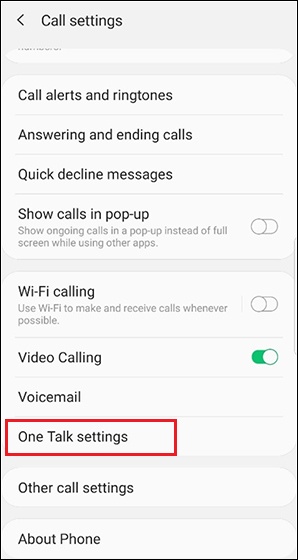
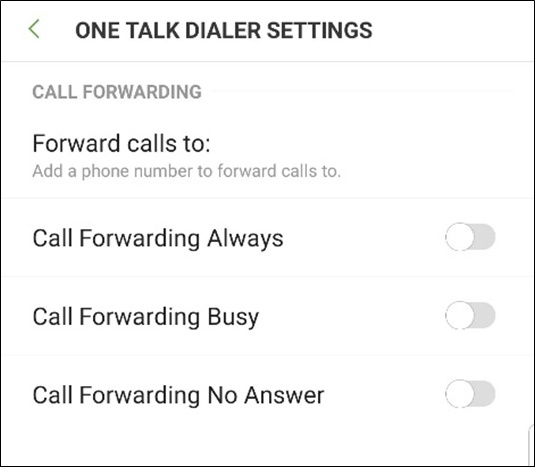
Settings. - TapOne Talk settingsto display call forwarding options.