One Talk - Update Business Address (E911)
Here's how to update the e911 business address for your desk phone via the One Talk portal.
Refer to the One Talk admin portal simulator for interactive demonstrations.
One Talk Web Portal
- Sign in to My Business.
- ClickManageAccount.
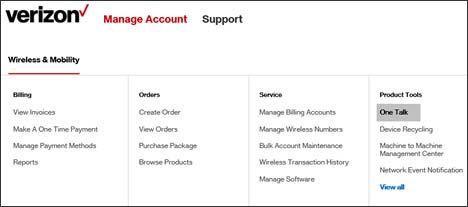
- From the Product Tools section, clickOne Talk.If necessary, clickView all.To navigate, mouse over each option.
- From the 'I want to' section, clickManage lines and devices.
- If necessary, select the desired group from the dropdown menu then click theDevices tab.
- Click the preferred desk phone in the list.Only desk phones can receive directory info; don't select smartphones or mobile clients.
- If necessary, clickAssociated devicesthen clickDesk phone.The 911 address doesn't display for lines that only have a One Talk mobile client on the line.
- ClickEdit(in the '911 Address' section).
- Enter the desired 911 address then clickSubmit.
Mobile App
- Open the One Talk mobile app.
- Tap theMenu icon
(upper-left).
- TapSettings.
- Tap911 Address.
- Enter or confirm the 911 address then tapUpdate.