Windows 10 - Create a Microsoft Account
Here's how to create a Microsoft account for your Windows 10 device.
- If your device isn't running Windows® 10, refer to the Windows 8 instructions.
- The following steps only apply if you signed in without a Microsoft® account during the initial setup of your device and don't have an existing account to use.
- The first Microsoft account to sign in is designated as the owner of the device. Any subsequent accounts that are used to sign in won't have owner privileges (the ability to change or modify users, etc.).
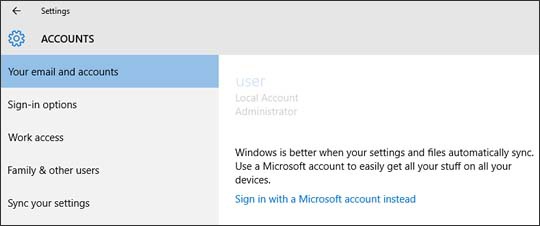
- From the Windows desktop, navigate:.StartSettings icon
- SelectSign in with a Microsoft account instead(below the Local Account name and info).
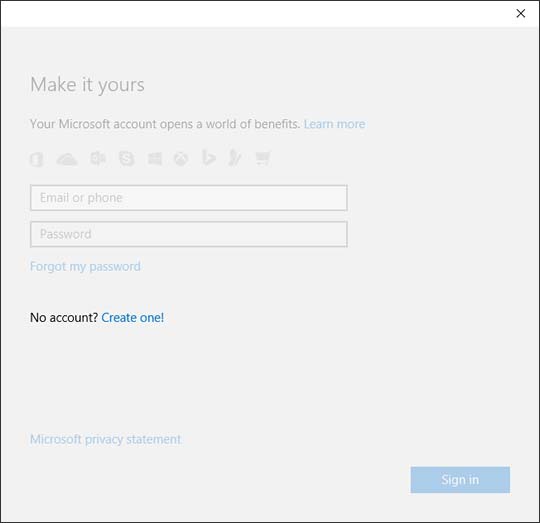
- From the 'No account' section, selectCreate one.
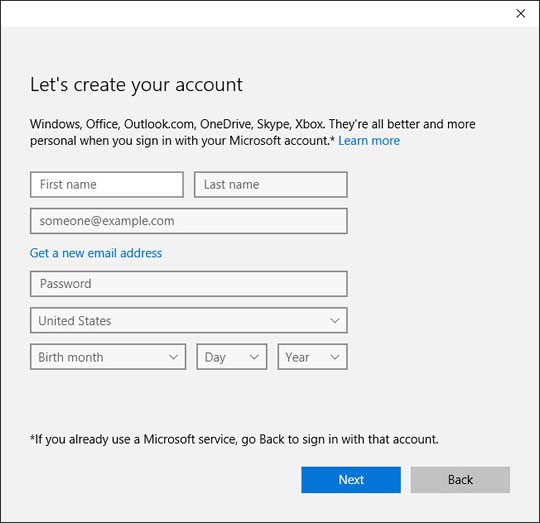
- Enter the required info (e.g., Name, email address, password, etc.) then selectNext.If presented, follow the remaining prompts to complete setup.