Session status messages
Session Status

Due to inactivity, your session will end in approximately 2 minutes. Extend your session by clicking OK below.

Due to inactivity, your session has expired. Please sign in again to continue.

Opening Windows ® Device Manager - Windows 10

2026-10-22 20:06:38.43

Opening Windows® Device Manager - Windows 10

Here's how to open Device Manager in Windows 10.
If your Windows operating system is unknown, refer to Determining Software Version - Windows.
  1. From either the Windows desktop home page or tiles home page, right-click the
    Start button
    .
    If using only a keyboard,
    1. Press the
      Windows
      and
      X keys
      together.
    2. Use the
      Up arrow
      to highlight 'Device Manager' then press
      Enter
      .
    Start Icon
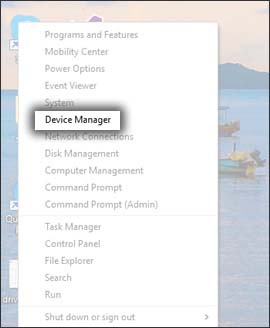
  2. Click
    Device Manager
    .
    Click Device Manager